 TV Control
Every screen.
One tap.
Quickesign TV Control discovers, powers, and schedules every Roku, Google TV, and Fire TV in your signage network. All from your phone, tablet, or PC.
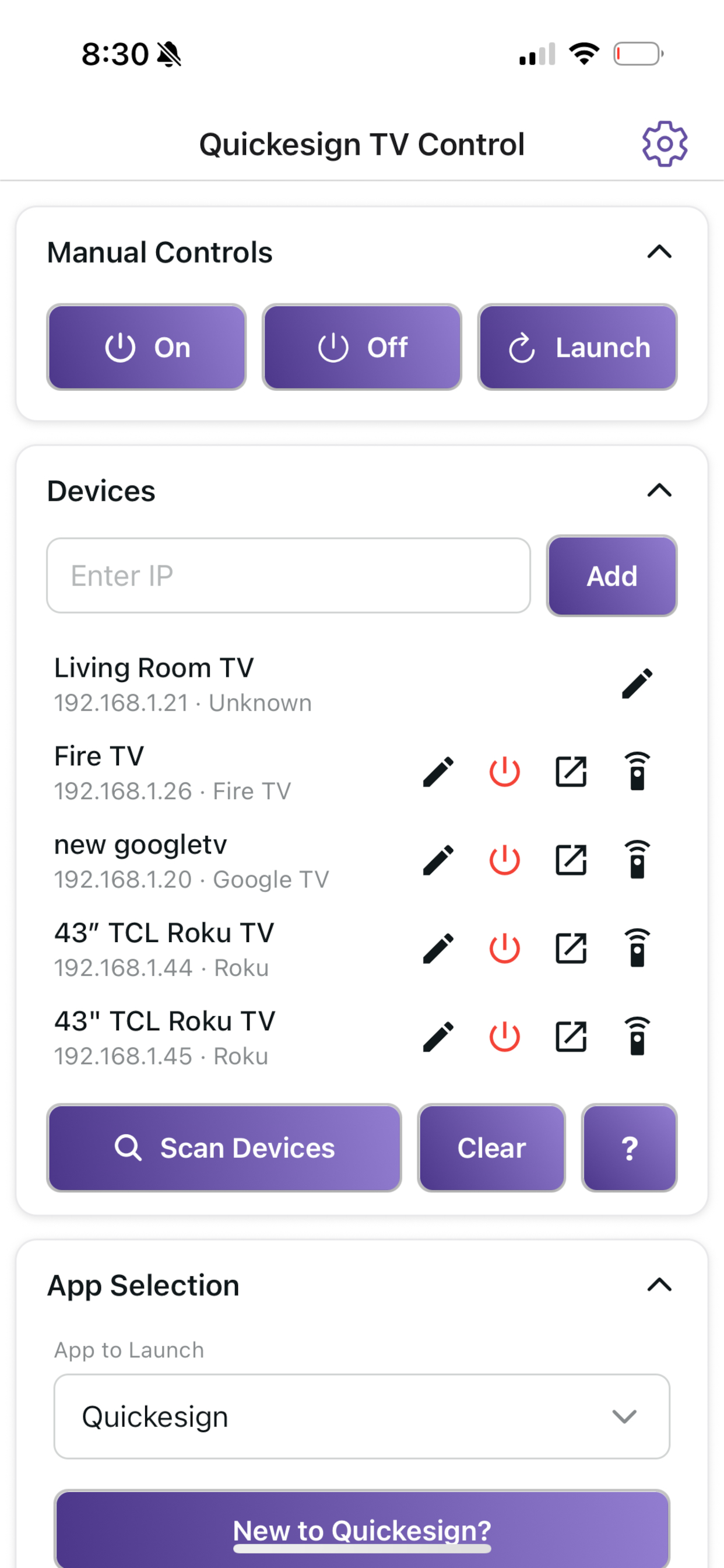
Control All Your Screens From One Device
Built for the people who manage menus, lobbies, classrooms, and store displays. No more looking for a remote per TV. One app for the whole location.
Auto-discovery
The app finds every Roku TV, Google TV, and Fire TV on your network automatically. No IP addresses to type in.
One tap power
Turn every TV on or off at once. Open in the morning, shut down at close, all from a single control.
Automatic scheduling
Set on and off times and your screens follow the calendar on their own. Before opening, after hours, every day.
Keeps signage running
Launches Quickesign and makes sure it stays running, so your displays never get stuck on a home screen.
Full streaming remote
A complete remote for Roku, Fire TV, and Google TV. Switch between TVs with one tap and pin your favorite channels.
Carry it everywhere
Same control on iPhone, Android phone or tablet.
Supported Platforms
Quickesign TV Control works across the three most common signage TV platforms. Feature availability depends on the device you control from.
| Control from | Roku TV | Google TV | Fire TV | Full remote |
|---|---|---|---|---|
| iOS — iPhone / iPad | ||||
| Android — phone / tablet |
Google TV & Fire TV pair while the TV is on. Deep-sleep power-on may require adding the TV's MAC address.
Setup
Change these settings to allow Quickesign to launch your signage app and power TVs on and off.
ROKUAllow the app to launch
Set this to Enabled so Quickesign can open and stay running on the TV.
ROKUAllow power on & off
Turn this On so the TV can be powered on and off remotely.
GOOGLE TVPair each TV
Pair every Google TV to the app while the TV is on. For power-on from deep sleep, you may need to add the TV's MAC address.
FIRE TVPair each TV
Pair every Fire TV to the app while the TV is on. For power-on from deep sleep, you may need to add the TV's MAC address.
Frequently asked questions
Can TV control control multiple TVs for digital signage?
How do I turn off all of my digital signage TVs at once?
Can I schedule my TVs to turn on and off automatically?
Does it work with Roku TV, Google TV and Fire TV?
Is there a version for iPhone, Android, and Windows?
How do I enable power control for Roku TVs?
Is Quickesign TV Control free?
Can I use it as a full TV remote?
Take control of every screen
Install Quickesign TV Control on the device you already carry.